

Employee Scheduling
This tutorial:
-
Is based on employee-scheduling, an OptaPy tutorial for employee scheduling.
-
Shows how to improve the OptaPy result by applying parallel continuous optimization.
-
Illustrates how easy it is to define the corresponding fitness function.
-
Applies multi-objective optimization to generate a set of non-dominated scheduling choices with an additional competing objective.
The code for this tutorial is here:
Motivation
Employee scheduling is a common optimization problem. It includes hard constraints, for example when an employee lacks the required skill for a slot or is unavailable on a given day. It also includes soft constraints, for example when an employee prefers a specific shift. These constraints need clear priorities.
Continuous optimization is not a common first choice here. Recent developments make it far more practical. The main reasons are:
This means that even if a scheduling or planning problem needs millions of fitness evaluations, the runtime can still be measured in seconds.
That is only part of the story. What if you want to add another competing objective and generate several non-dominated choices, a so-called pareto-front? In continuous optimization this is largely a solved problem. You get that capability almost for free. Traditional scheduling optimizers such as OptaPy do not make this as straightforward.
One possible objection is that a dedicated scheduling API may be easier to use for this kind of problem. A fair answer is to show an alternative. We will define a fitness function for the same problem and let the reader decide which approach is easier.
Employee Scheduling using OptaPy
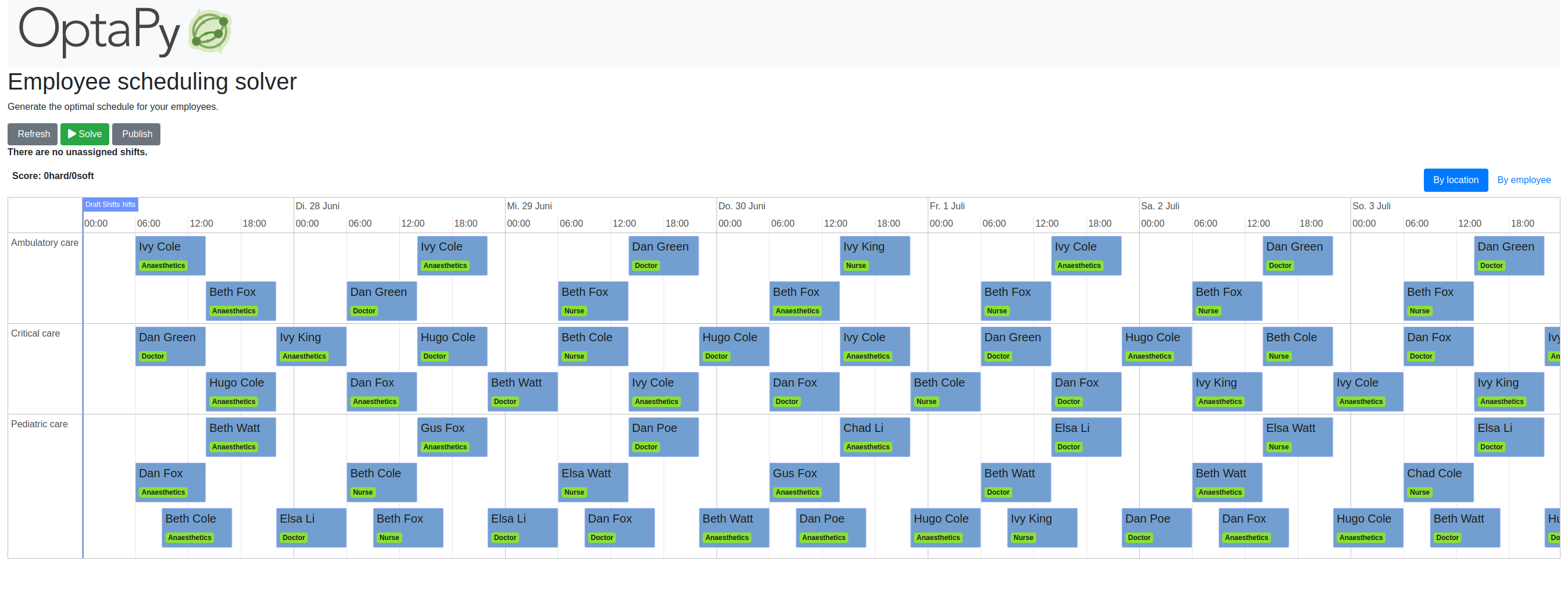
We recommend that you try the original employee-scheduling example first. The concrete instance is generated randomly, but you will see a schedule similar to this one:
If you switch to the employee view:
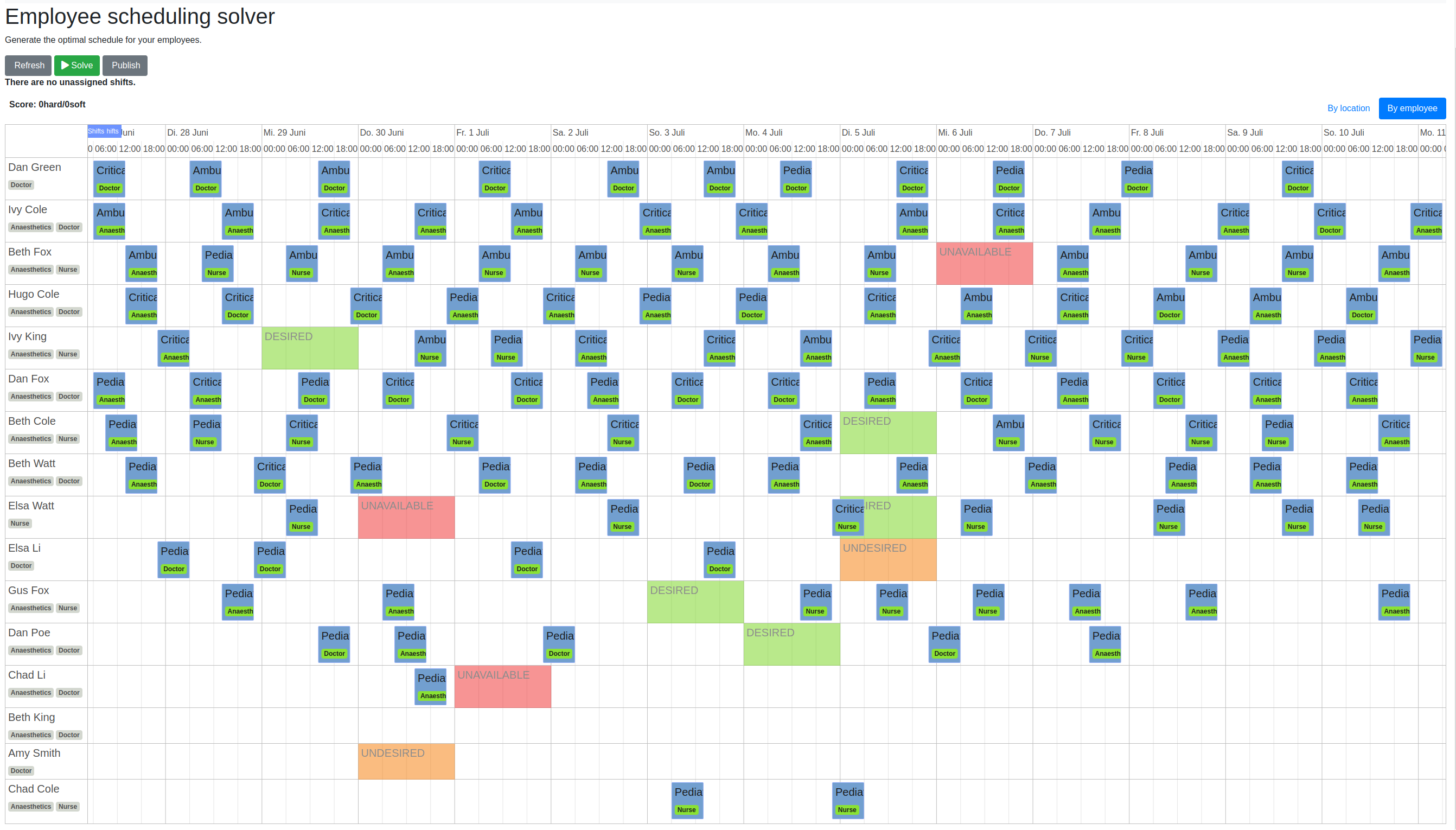
you will notice two things:
-
Some employees are almost doing nothing.
-
The green slots are almost empty. This means the employees' wishes to work on a specific day are almost ignored.
If you interpret the DESIRED fields as days an employee wants to work, and use the start of a shift to
identify the day, then no desires are fulfilled.
We get:
desired shift days 0
shifts per employee [11, 13, 13, 13, 12, 14, 11, 12, 7, 4, 8, 5, 1, 0, 0, 2]
min shifts per employee 0
mean shifts per employee 7.875
std shifts per employee 4.998437255783052
What happens if we repeat the experiment? We always end up with the same result, so there are no alternatives to choose from.
Now imagine deploying such a schedule in the real world. Some employees would likely prefer to work elsewhere. Hiring replacements is expensive, so it is worth checking whether we can do better.
Update
It turned out that there is a bug in the optapy example. Its optimizer is able to fulfill the DESIRED shifts
if configured correctly. Defining a constraint that optimizes the distribution of shifts should also be possible
in principle, but this currently does not work because of another optapy bug.
We will update the tutorial when this is finally fixed.
Generating a Test Problem
We used the following code to generate the JSON representation of an employee scheduling problem with OptaPy.
def save_solution():
    global schedule
    generate_demo_data()
    solve()
    while get_solver_status() != SolverStatus.NOT_SOLVING:
        time.sleep(5)
        print(get_solver_status())
    solver_status = get_solver_status()
    solution = schedule
    score = score_manager.updateScore(solution)
    solution.solver_status = solver_status
    solution.score = score
    sched = solution.to_dict()
    sched_json = json.dumps(sched)
    print(sched_json)
    with open('sched.json', 'w') as outfile:
        outfile.write(sched_json)
This JSON already contains an OptaPy solution, which we will ignore. We did not find a way to export the problem without solving it first.
Our code in employee.py is completely independent of OptaPy and of the example code in employee-scheduling. It depends only on the generated problem instance.
Representing the Employee Scheduling JSON instance as Optimization Problem
We can now read the solution-independent parts of the generated JSON and turn them into a continuous optimization problem with a fitness function:
class problem():

    def __init__(self, json_file):
        with open(json_file) as json_file:
            sched = json.load(json_file)

        self.shifts = sched['shift_list']
        self.shift_to_index, self.days, self.locations, self.required_skills, \
                self.sec_start, self.sec_end = shift_indices(self.shifts)
        self.day_to_index, self.day_ids = index_map(self.days)
        self.location_to_index, self.location_ids = index_map(self.locations)

        self.employees = sched['employee_list']
        self.employee_to_index, self.names, self.skill_sets = employee_indices(self.employees)
        self.name_to_index, self.name_ids = index_map(self.names)
        self.skill_to_index, self.skill_set_ids = index_multi_map(self.skill_sets)
        self.required_skill_ids = np.array([self.skill_to_index[s] for s in self.required_skills])

        self.avails = sched['availability_list']
        self.avail_to_index, self.avail_names, self.avail_types, self.avail_days = avail_indices(self.avails)
        self.avail_name_ids = np.array([self.name_to_index[n] for n in self.avail_names])
        self.avail_day_ids = np.array([self.day_to_index[d] for d in self.avail_days])
        self.avail_type_ids = np.array([avail_type_map[t] for t in self.avail_types])

        self.dim = len(self.shifts)
        self.bounds = Bounds([0]*self.dim, [len(self.employees)-1E-9]*self.dim)

    def fitness(self, x):
        score, employee_num_shifts = fitness_(x.astype(int), self.day_ids,
                    self.required_skill_ids, self.skill_set_ids, self.avail_name_ids,
                    self.avail_day_ids, self.avail_type_ids, self.sec_start, self.sec_end)
        return score + 10*np.std(employee_num_shifts)
We convert all information into numpy index arrays, together with lists that let us recover the original representation from these indices.
This representation speeds up fitness evaluation when using numba. numba works well with numpy arrays and poorly with Python objects. The indexed form also makes comparisons faster.
The fitness function forwards these index arrays to the fast numba function
fitness_(x.astype(int), … discussed below. Note that the continuous decision vector
x is converted to discrete integer values using x.astype(int).
Implementing the Fitness Function
The fitness function checks how many hard and soft constraints
an employee schedule employees_at_shift, given as a decision vector, violates.
We multiply hard constraints by 1000 to prioritize them. UNDESIRED
constraints, where an employee prefers not to work on a specific day,
get factor 100. DESIRED constraints,
where an employee wants to work on a specific day, get a negative
factor -1, because we want to maximize their fulfillment.
@njit(fastmath=True)
def fitness_(employees_at_shift, day_ids, required_skill_ids, skill_set_ids,
             avail_names_ids, avail_days_ids, avail_type_ids, sec_start, sec_end):
    score = 0
    num_employees = len(skill_set_ids)
    employee_last_day = np.full(num_employees, -1, dtype=numba.int32)
    employee_last_end = np.full(num_employees, -1, dtype=numba.int32)
    employee_num_shifts = np.zeros(num_employees, dtype=numba.int32)
    for shift in range(len(employees_at_shift)):
        day = day_ids[shift]
        employee = employees_at_shift[shift]
        employee_num_shifts[employee] += 1
        if employee_last_day[employee] == day:
            score += 1000  # employee should only work once a day
        employee_last_day[employee] = day
        if sec_start[shift] - employee_last_end[employee] < 10*3600:
            score += 1000  # employee should pause for 10 hours (and shifts should not overlap)
        employee_last_end[employee] = sec_end[shift]
        required_skill = required_skill_ids[shift]
        skill_set = skill_set_ids[employee]
        if not required_skill in skill_set:
            score += 1000 # employee has wrong skill set
        avail_ids = np.where(avail_names_ids == employee)
        for avail_id in avail_ids[0]:
            avail_day = avail_days_ids[avail_id]
            if day == avail_day:
                type = avail_type_ids[avail_id]
                if type == UNDESIRED:
                    score += 100 # employee does not want to work this day
                elif type == UNAVAILABLE:
                    score += 1000 # employee is unavailable
                elif type == DESIRED:
                    score -= 100 # employee works at desired day
    return score, employee_num_shifts
You may compare the complexity of this code to
constraints.py and
domain.py.
The fitness function above does not require specific domain objects or a
"schedule solver" API, but it is still quite readable. It also does more:
it counts the number of shifts for each employee and returns this as an array. You can use
np.std(employee_num_shifts) or -min(employee_num_shifts) to support a more
equal distribution of work. This is how we encourage a fair number of shifts for all employees.
Single Objective Optimization
We call fcmaes.retry.minimize_plot because we want to monitor and plot progress over time.
It takes a continuous optimizer as an argument. We recommend trying BiteOpt first, not only for
this problem, because it does not need special parameter tuning and is mostly self-adapting.
fcmaes.retry uses mp.cpu_count() parallel workers by default. On our AMD 16 core 5950x,
this leads to 32 optimizations running in parallel.
    def fitness(self, x):
        score, employee_num_shifts = fitness_(x.astype(int), self.day_ids,
                    self.required_skill_ids, self.skill_set_ids, self.avail_name_ids,
                    self.avail_day_ids, self.avail_type_ids, self.sec_start, self.sec_end)
        return score + 10*np.std(employee_num_shifts)

    def optimize(self):
        self.fitness(np.random.uniform(0, len(self.employees), self.dim).astype(int))
        res = retry.minimize_plot("schedule.bite.400k", Bite_cpp(400000),
        #res = retry.minimize_plot("schedule.de.400k", De_cpp(400000, popsize = 512, ints = [True]*self.dim),
                    wrapper(self.fitness), self.bounds, num_retries=32, plot_limit=10000)
        print(self.fitness_mo(res.x))
        self.show(res.x)
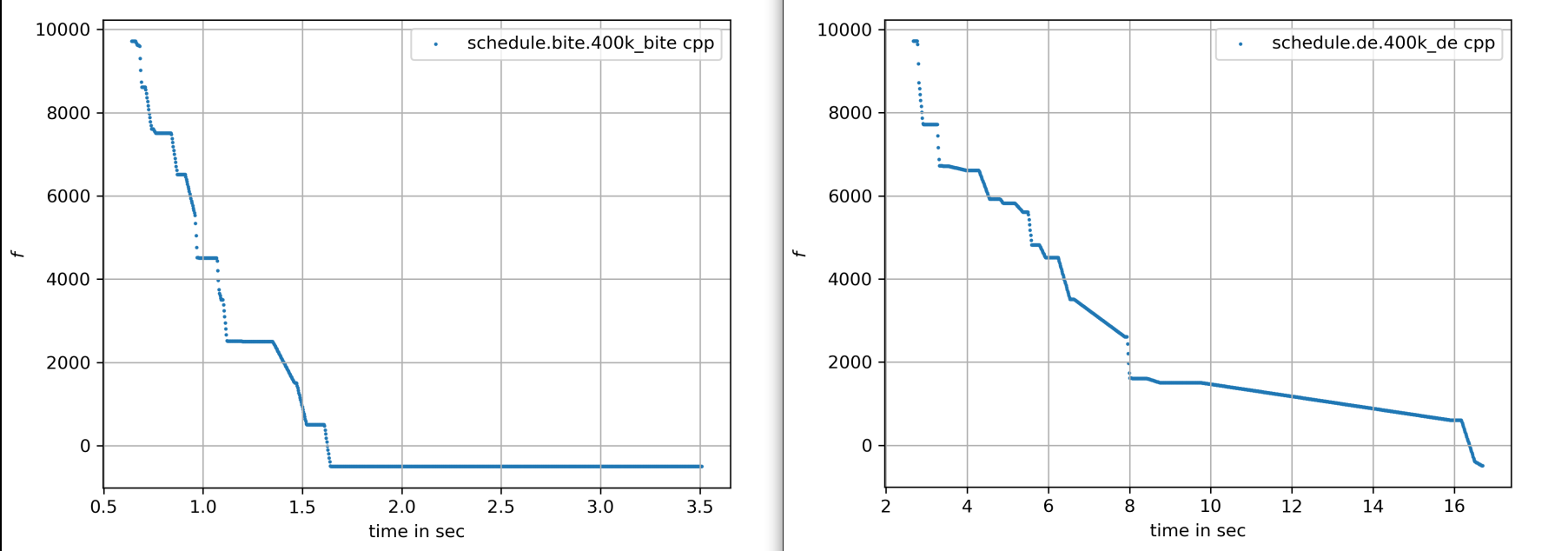
In the diagrams below you can see:
-
Both BiteOpt and Differential Evolution can solve this problem.
-
Less than three seconds are needed to find the solution, although the optimizer runs a bit longer.
self.show(res.x) prints the result in a human-readable form. It converts the indices back into schedules,
employees, and fulfilled or violated constraints. We see that all 5 DESIRED work day constraints are fulfilled,
and every employee gets at least 5 assigned shifts.
desired shift days 5
shifts per employee [7, 7, 8, 8, 8, 8, 8, 8, 8, 8, 8, 8, 8, 8, 8, 8]
min shifts per employee 7
mean shifts per employee 7.875
std shifts per employee 0.33071891388307384
What happens if we repeat the BiteOpt optimization? We get:
desired shift days 5
shifts per employee [8, 8, 8, 8, 8, 8, 8, 8, 8, 7, 8, 8, 8, 8, 7, 8]
min shifts per employee 7
mean shifts per employee 7.875
std shifts per employee 0.33071891388307384

desired shift days 5
shifts per employee [7, 8, 8, 8, 8, 8, 8, 8, 8, 7, 8, 8, 8, 8, 8, 8]
min shifts per employee 7
mean shifts per employee 7.875
std shifts per employee 0.33071891388307384
...
So we get different valid results to choose from. This process can obviously be
parallelized across different cloud CPU nodes. The last result has a very even work distribution
and fulfills 5 work day desires. OptaPy always produces the same result, even if we configure
<environmentMode>NON_REPRODUCIBLE</environmentMode> in its configuration.
Multi-Objective Fitness
For the fitness function, the only change is that instead of adding -0.1*np.std(employee_num_shifts) to the first objective,
we return np.std(employee_num_shifts) as a second objective. Alternatively, we could maximize
the minimum number of assigned shifts for an employee with -min(employee_num_shifts).
    def fitness_mo(self, x):
        score, employee_num_shifts = fitness_(x.astype(int), self.day_ids,
                    self.required_skill_ids, self.skill_set_ids, self.avail_name_ids,
                    self.avail_day_ids, self.avail_type_ids, self.sec_start, self.sec_end)
        return [score, np.std(employee_num_shifts)]
        #return [score, -min(employee_num_shifts)]
Multi-Objective Optimization
Since fcmaes offers only one multi-objective optimizer, MODE, the main
choice is whether to use differential evolution or NSGA-II population
update through the parameter nsga_update=True. It is worth trying both.
For this problem, NSGA-II population update works better.
Multi-objective optimization usually needs a larger population size, so we choose 512 here.
    def optimize_mo(self):
        self.fitness_mo(np.random.uniform(0, len(self.employees), self.dim).astype(int))
        pname = "schedule_mo_600k.512"
        xs, ys = modecpp.retry(mode.wrapper(self.fitness_mo, 2),
                     2, 0, self.bounds, popsize = 512, max_evaluations = 600000,
                     nsga_update=True, num_retries = 32, workers=32)
        np.savez_compressed(pname, xs=xs, ys=ys)
        xs, ys = moretry.pareto(xs, ys)
        for x, y in zip(xs, ys):
            print(str(list(y)) + ' ' + str([int(xi) for xi in x]))
As a result, after about 36 seconds, we get lists of corresponding argument vectors (xs) and function values (ys).
Together they represent the set of non-dominated solutions, the pareto-front:
[-400.0, 0.7806247497997998] [3, 10, 14, 12, 2, 5, 1, 11, 9, 0, 7, 15, 14, 11, 6, 10, 13, 9, 8, 3, 10, 13, 12, 4, 7, 0, 15, 4, 2, 1, 5, 6, 11, 13, 7, 15, 10, 4, 3, 14, 11, 13, 2, 1, 0, 2, 9, 7, 4, 1, 13, 10, 8, 12, 15, 9, 3, 11, 4, 10, 5, 13, 0, 5, 13, 14, 11, 6, 12, 3, 10, 4, 8, 5, 1, 14, 4, 12, 2, 7, 0, 3, 8, 9, 7, 4, 15, 6, 14, 10, 6, 5, 15, 8, 10, 11, 3, 12, 1, 0, 8, 9, 2, 13, 6, 5, 7, 12, 6, 4, 11, 9, 14, 1, 2, 8, 15, 12, 1, 3, 11, 15, 5, 2, 6, 8]
[-300.0, 0.6959705453537527] [11, 2, 14, 5, 7, 13, 1, 10, 0, 14, 5, 1, 3, 13, 15, 2, 12, 9, 6, 7, 8, 4, 14, 2, 12, 11, 13, 3, 10, 0, 2, 15, 12, 6, 1, 4, 8, 3, 0, 9, 13, 11, 10, 1, 14, 10, 0, 2, 8, 4, 15, 5, 6, 3, 10, 9, 13, 5, 6, 15, 12, 7, 0, 12, 5, 14, 7, 6, 11, 9, 10, 8, 4, 10, 3, 0, 5, 11, 2, 7, 14, 3, 15, 9, 4, 10, 8, 6, 1, 12, 11, 5, 3, 15, 10, 7, 1, 6, 13, 11, 6, 9, 4, 13, 8, 12, 1, 10, 15, 2, 11, 14, 0, 7, 4, 8, 5, 9, 3, 1, 13, 4, 7, 8, 2, 15]
[500.0, 0.4841229182759271] [1, 5, 14, 4, 3, 7, 15, 10, 0, 9, 7, 12, 14, 0, 15, 4, 2, 11, 4, 13, 8, 10, 12, 1, 14, 9, 3, 1, 10, 0, 11, 6, 5, 13, 2, 7, 15, 2, 14, 0, 6, 9, 8, 11, 3, 4, 14, 1, 2, 7, 12, 13, 8, 5, 15, 12, 9, 2, 4, 10, 11, 14, 0, 11, 5, 3, 1, 6, 7, 9, 15, 10, 4, 3, 13, 14, 6, 7, 8, 5, 0, 7, 4, 9, 12, 15, 10, 8, 13, 1, 11, 12, 6, 10, 8, 5, 3, 13, 1, 5, 6, 0, 2, 12, 15, 10, 3, 11, 13, 8, 1, 3, 5, 7, 2, 6, 15, 9, 10, 4, 11, 12, 13, 8, 6, 2]
[1500.0, 0.33071891388307384] [1, 5, 14, 4, 3, 7, 15, 10, 0, 9, 7, 12, 14, 0, 15, 4, 2, 11, 4, 13, 8, 10, 12, 1, 14, 9, 3, 1, 10, 0, 11, 6, 5, 13, 2, 7, 15, 2, 14, 0, 6, 9, 8, 11, 3, 4, 14, 1, 2, 7, 12, 13, 8, 5, 15, 12, 9, 2, 4, 10, 11, 14, 0, 11, 5, 3, 1, 6, 7, 9, 15, 10, 4, 3, 13, 14, 6, 7, 8, 5, 0, 7, 4, 9, 12, 15, 10, 8, 13, 1, 11, 12, 6, 10, 8, 5, 3, 13, 1, 5, 6, 0, 2, 12, 15, 10, 3, 11, 13, 8, 1, 3, 5, 7, 2, 6, 15, 14, 9, 4, 11, 12, 13, 8, 6, 2]
We can use problem.show on these solutions to inspect the details.
Multi-objective optimization helps diversify the set of possible schedules by representing different compromises between the objectives. We do not need to choose weights in advance, and objective scaling does not matter. Instead, we get a set of choices and decide afterwards what we prefer. For this specific problem instance, the number of choices is quite limited. Larger employee scheduling instances with more valid assignments will usually offer more alternatives.
Edit and execute employee.py
to reproduce our results. Expect slower timings on older CPUs with fewer cores.
We used a 16 core AMD 5950x. fcmaes is mainly about using all resources of modern
many-core CPUs.
Challenge
We modified the problem generation settings in services.py to create a tougher challenge:
-
More optional skills
["Anaesthetics", "Surgery", "Radiology"] -
Roster length of 28 days:
-
20 employees
-
Skill distribution
skills = pick_subset(OPTIONAL_SKILLS, random, 1, 4, 4)
OPTIONAL_SKILLS = ["Anaesthetics", "Surgery", "Radiology"]
...
    INITIAL_ROSTER_LENGTH_IN_DAYS = 28
...
    for i in range(20):
        skills = pick_subset(OPTIONAL_SKILLS, random, 1, 4, 4)
This is still a setting that OptaPy can solve. We tried several time limits:
time spent (100056), best score (-1hard/-480soft), score calculation speed (84/sec) step total (280).
time spent (200053), best score (-1hard/-480soft), score calculation speed (61/sec) step total (609).
time spent (300029), best score (-1hard/-480soft), score calculation speed (46/sec) step total (755).
time spent (400011), best score (-1hard/-480soft), score calculation speed (52/sec) step total (1436).
time spent (600030), best score (-1hard/0soft), score calculation speed (55/sec) step total (2631).
time spent (800051), best score (-1hard/0soft), score calculation speed (35/sec) step total (2111).
time spent (1200084), best score (-1hard/0soft), score calculation speed (31/sec) step total (3068).
time spent (1600059), best score (-1hard/0soft), score calculation speed (47/sec) step total (6529).
time spent (2400029), best score (0hard/-2880soft), score calculation speed (38/sec) step total (8148).
time spent (3200127), best score (0hard/-1440soft), score calculation speed (37/sec) step total (10865).
time spent (4800145), best score (0hard/-480soft), score calculation speed (45/sec) step total (19716).
time spent (20000064), best score (0hard/0soft), score calculation speed (21/sec) step total (72491).
20000 seconds is sufficient. We ran OptaPy 12 times with this limit and always got:
desired shift days 0
shifts per employee [11, 17, 16, 17, 13, 6, 12, 14, 18, 18, 9, 14, 9, 15, 5, 7, 12, 13, 15, 11]
min shifts per employee 5
mean shifts per employee 12.6
std shifts per employee 3.8000000000000003
No desired work day is fulfilled, and the standard deviation of shift assignments across employees is quite large.
We need to reconfigure the single-objective optimization to handle the increased complexity:
    def optimize(self):
        self.fitness(np.random.uniform(0, len(self.employees), self.dim).astype(int))
        res = retry.minimize_plot("schedule.bite.400k", Bite_cpp(400000),
        #res = retry.minimize_plot("schedule.de.10000k", De_cpp(10000000, popsize = 10000, ints = [True]*self.dim),
        print(self.fitness_mo(res.x))
        self.show(res.x)
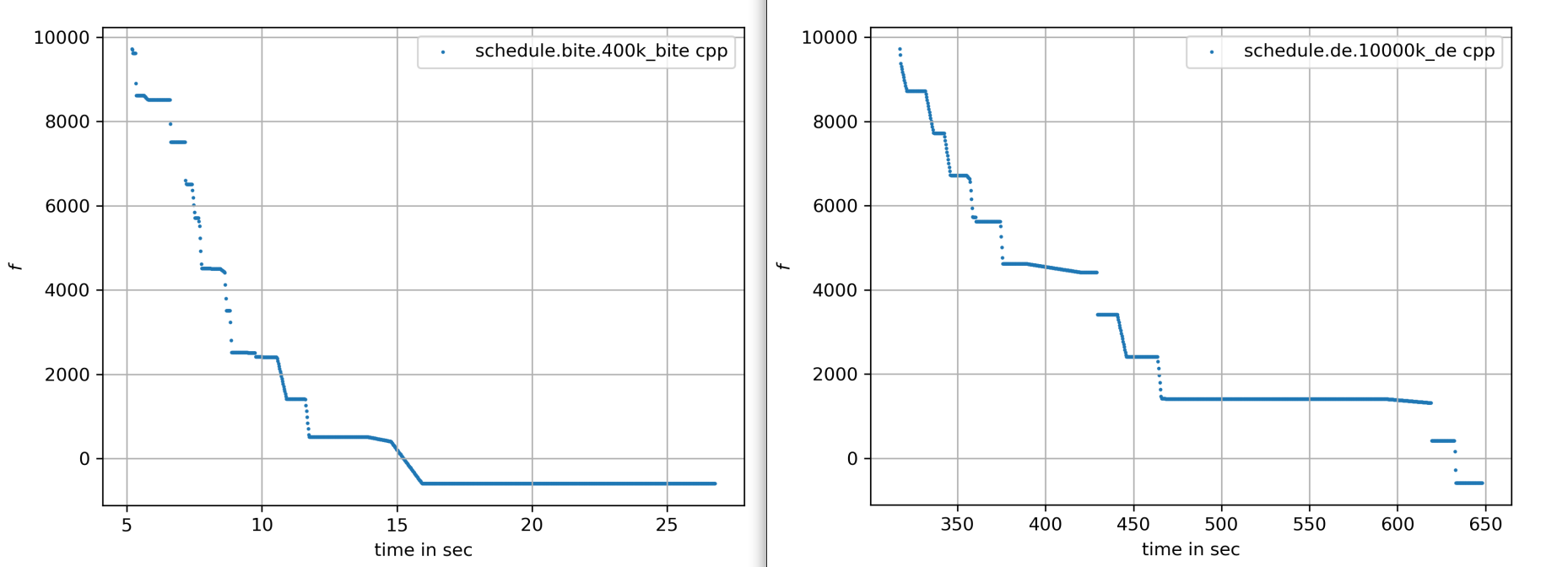
Note that Differential Evolution now needs a huge population size. BiteOpt can still solve the problem in a reasonable time of about 30 seconds:
Different BiteOpt runs produce the following solutions:
{'name': 'Elsa Li', ... 'date': '2022-07-18', 'availability_type': 'UNDESIRED'}
desired shift days 6
shifts per employee [11, 13, 13, 14, 13, 11, 13, 13, 13, 14, 11, 13, 11, 13, 12, 11, 13, 13, 14, 13]
min shifts per employee 11
mean shifts per employee 12.6
std shifts per employee 1.0198039027185568

desired shift days 6
shifts per employee [11, 13, 13, 13, 13, 11, 13, 14, 13, 14, 11, 14, 11, 13, 11, 11, 13, 13, 13, 14]
min shifts per employee 11
mean shifts per employee 12.6
std shifts per employee 1.1135528725660042

desired shift days 6
shifts per employee [11, 13, 14, 13, 14, 12, 13, 13, 13, 13, 12, 13, 11, 13, 11, 11, 13, 13, 13, 13]
min shifts per employee 11
mean shifts per employee 12.6
std shifts per employee 0.9165151389911679
...
The last solution has a fairly even shift distribution and fulfills six work day desires.
But the first solution also shows that not all soft requirements are always satisfied. Elsa Li
still has to work on an undesired day.
For multi-objective optimization we also need to adapt the parameters:
        xs, ys = modecpp.retry(mode.wrapper(self.fitness_mo, 2),
                 2, 0, self.bounds, popsize = 4096, max_evaluations = 20000000,
             nsga_update=True, num_retries = 32, workers=32)
We then find a pareto front that offers more scheduling choices:
[-600.0, 2.437211521390788] [0, 10, 14, 16, 8, 15, 12, 1, 6, 14, 19, 2, 4, 17, 12, 1, 18, 7, 14, 2, 1, 19, 13, 10, 3, 18, 4, 3, 11, 9, 16, 5, 10, 19, 12, 0, 6, 19, 4, 17, 14, 3, 10, 8, 11, 18, 13, 9, 4, 3, 7, 16, 6, 0, 9, 1, 15, 10, 14, 12, 2, 11, 18, 9, 1, 15, 8, 7, 17, 11, 4, 3, 15, 16, 9, 8, 11, 6, 17, 1, 2, 13, 1, 17, 8, 6, 4, 18, 12, 7, 2, 8, 4, 9, 11, 3, 15, 10, 1, 2, 6, 16, 8, 1, 18, 9, 7, 11, 13, 9, 17, 15, 1, 4, 18, 6, 8, 17, 3, 7, 4, 19, 11, 2, 14, 9, 6, 13, 5, 11, 14, 18, 16, 0, 3, 2, 12, 15, 9, 1, 6, 19, 4, 10, 3, 9, 15, 13, 12, 17, 14, 2, 10, 18, 13, 3, 6, 9, 14, 16, 1, 17, 7, 5, 3, 15, 6, 0, 8, 2, 16, 7, 11, 12, 2, 3, 8, 5, 13, 1, 7, 19, 4, 5, 17, 9, 16, 13, 3, 4, 19, 8, 12, 18, 14, 10, 5, 3, 8, 16, 4, 2, 6, 7, 13, 19, 17, 18, 2, 7, 19, 9, 8, 15, 1, 6, 11, 7, 4, 15, 10, 12, 0, 16, 17, 8, 1, 11, 18, 16, 5, 13, 14, 19, 17, 6, 9, 12, 7, 13, 3, 2, 18, 4, 5, 11, 19, 15, 1, 2, 13, 7]
[-500.0, 2.4166091947189146] [0, 10, 14, 16, 8, 15, 12, 1, 6, 14, 19, 2, 4, 17, 12, 1, 18, 7, 14, 2, 1, 19, 13, 10, 3, 18, 4, 3, 11, 9, 16, 5, 10, 19, 12, 0, 6, 19, 4, 17, 14, 3, 10, 8, 11, 18, 13, 9, 4, 3, 7, 16, 6, 0, 9, 1, 15, 10, 14, 12, 2, 11, 16, 9, 1, 15, 8, 7, 17, 11, 4, 3, 15, 16, 9, 8, 11, 6, 17, 1, 2, 13, 1, 17, 8, 6, 4, 18, 12, 7, 2, 8, 4, 9, 11, 3, 15, 10, 1, 3, 6, 16, 8, 1, 18, 9, 7, 11, 13, 9, 17, 15, 1, 4, 18, 6, 8, 17, 3, 7, 4, 19, 11, 2, 14, 9, 6, 13, 5, 11, 14, 18, 16, 0, 3, 2, 12, 15, 9, 1, 6, 19, 4, 10, 3, 9, 15, 13, 12, 17, 14, 2, 10, 18, 13, 3, 6, 9, 14, 16, 1, 17, 7, 5, 3, 15, 6, 0, 8, 2, 14, 7, 11, 12, 2, 3, 8, 5, 13, 1, 7, 19, 4, 5, 17, 9, 16, 13, 2, 4, 19, 8, 12, 18, 14, 10, 5, 3, 8, 16, 4, 2, 6, 7, 13, 19, 17, 18, 2, 7, 19, 9, 8, 15, 1, 6, 11, 7, 4, 15, 10, 12, 0, 16, 17, 8, 1, 11, 18, 16, 5, 13, 14, 19, 17, 6, 9, 12, 7, 13, 3, 2, 18, 4, 5, 11, 19, 15, 1, 2, 13, 7]
[400.0, 2.2449944320643644] [0, 10, 14, 16, 8, 15, 12, 1, 6, 14, 19, 2, 4, 17, 12, 1, 18, 7, 14, 2, 1, 19, 13, 10, 3, 18, 4, 3, 11, 9, 16, 5, 10, 19, 12, 0, 6, 19, 4, 17, 14, 3, 10, 8, 11, 18, 13, 9, 4, 3, 7, 16, 6, 0, 9, 1, 15, 10, 14, 12, 2, 11, 18, 9, 0, 15, 8, 7, 17, 11, 4, 3, 15, 16, 9, 8, 11, 6, 17, 1, 2, 13, 1, 17, 8, 6, 4, 18, 12, 7, 2, 8, 4, 9, 11, 3, 15, 10, 1, 2, 6, 16, 8, 1, 18, 9, 7, 11, 13, 9, 17, 15, 1, 4, 18, 6, 8, 17, 3, 7, 4, 19, 11, 2, 14, 9, 6, 13, 5, 11, 14, 18, 16, 0, 3, 2, 12, 15, 9, 1, 6, 19, 4, 10, 3, 9, 15, 13, 12, 17, 14, 2, 10, 18, 13, 3, 6, 9, 14, 16, 1, 17, 7, 5, 3, 15, 6, 0, 8, 2, 16, 7, 11, 12, 2, 3, 8, 5, 13, 1, 7, 19, 4, 5, 17, 9, 16, 13, 3, 4, 19, 8, 12, 18, 14, 10, 5, 3, 8, 16, 4, 2, 6, 7, 13, 19, 17, 18, 2, 7, 19, 9, 8, 15, 1, 6, 11, 7, 4, 15, 10, 12, 0, 16, 17, 8, 1, 11, 18, 16, 5, 13, 14, 19, 17, 6, 9, 12, 7, 13, 3, 2, 18, 4, 5, 11, 19, 15, 1, 2, 13, 7]
[500.0, 2.2226110770892866] [0, 10, 14, 16, 8, 15, 12, 1, 6, 14, 19, 2, 4, 17, 12, 1, 18, 7, 14, 2, 1, 19, 13, 10, 3, 18, 4, 3, 11, 9, 16, 5, 10, 19, 12, 0, 6, 19, 4, 17, 14, 3, 10, 8, 11, 18, 13, 9, 4, 3, 7, 16, 6, 0, 9, 1, 15, 10, 14, 12, 2, 11, 16, 9, 0, 15, 8, 7, 17, 11, 4, 3, 15, 16, 9, 8, 11, 6, 17, 1, 2, 13, 1, 17, 8, 6, 4, 18, 12, 7, 2, 8, 4, 9, 11, 3, 15, 10, 1, 2, 6, 16, 8, 1, 18, 9, 7, 11, 13, 9, 17, 15, 1, 4, 18, 6, 8, 17, 3, 7, 4, 19, 11, 2, 14, 9, 6, 13, 5, 11, 14, 18, 16, 0, 3, 2, 12, 15, 9, 1, 6, 19, 4, 10, 3, 9, 15, 13, 12, 17, 14, 2, 10, 18, 13, 3, 6, 9, 14, 16, 1, 17, 7, 5, 3, 15, 6, 0, 8, 2, 14, 7, 11, 12, 2, 3, 8, 5, 13, 1, 7, 19, 4, 5, 17, 9, 16, 13, 3, 4, 19, 8, 12, 18, 14, 10, 5, 3, 8, 16, 4, 2, 6, 7, 13, 19, 17, 18, 2, 7, 19, 9, 8, 15, 1, 6, 11, 7, 4, 15, 10, 12, 0, 16, 17, 8, 1, 11, 18, 16, 5, 13, 14, 19, 17, 6, 9, 12, 7, 13, 3, 2, 18, 4, 5, 11, 19, 15, 1, 2, 13, 7]
[1400.0, 2.0346989949375804] [5, 10, 14, 16, 8, 15, 12, 1, 6, 14, 19, 2, 4, 17, 12, 1, 18, 7, 14, 2, 1, 19, 13, 10, 3, 18, 4, 3, 11, 9, 16, 5, 10, 19, 12, 0, 6, 19, 4, 17, 14, 3, 10, 8, 11, 18, 13, 9, 4, 3, 7, 12, 6, 0, 9, 1, 15, 10, 14, 12, 2, 11, 18, 9, 1, 15, 8, 7, 17, 11, 4, 3, 15, 16, 9, 8, 11, 6, 17, 0, 2, 13, 1, 17, 8, 6, 3, 16, 12, 7, 2, 8, 4, 9, 11, 3, 15, 10, 1, 2, 6, 16, 8, 1, 18, 9, 7, 11, 13, 9, 14, 15, 1, 4, 18, 6, 8, 17, 3, 7, 4, 19, 11, 2, 14, 9, 6, 13, 5, 11, 14, 18, 16, 0, 3, 2, 12, 15, 9, 1, 6, 19, 4, 10, 3, 9, 15, 13, 12, 17, 14, 2, 10, 18, 13, 3, 6, 9, 14, 16, 1, 17, 7, 5, 3, 15, 6, 0, 8, 2, 16, 7, 11, 12, 2, 3, 8, 5, 13, 1, 7, 19, 4, 5, 17, 9, 16, 13, 2, 4, 19, 8, 12, 18, 14, 10, 5, 3, 8, 16, 4, 0, 6, 7, 13, 19, 17, 18, 2, 7, 19, 9, 8, 15, 1, 6, 11, 7, 4, 15, 10, 12, 0, 16, 17, 8, 1, 11, 18, 16, 5, 13, 14, 19, 17, 6, 9, 10, 7, 13, 3, 2, 18, 4, 5, 11, 19, 15, 1, 2, 13, 7]
...
Exercise
Is the result dependent on the optimization library used? To answer this question, try nevergrad, a very popular optimization library (> 40000 downloads last month, see https://pypistats.org/packages/nevergrad). You may start by testing NGOpt, CMA, DE, TwoPointsDE, for example:
    def optimize_ng(self):
        import nevergrad as ng
        fit = wrapper(self.fitness)
        instrum = ng.p.Instrumentation(
            ng.p.Array(shape=(self.dim,)).set_bounds(self.bounds.lb, self.bounds.ub)
            )
        optimizer = ng.optimizers.TwoPointsDE(parametrization=instrum, budget=100000)
        recommendation = optimizer.minimize(fit)
        print(recommendation.value)
self.show(recommendation.value[0][0])Conclusion
-
Multi-objective optimization can support decision-making even for large combinatorial scheduling problems.
-
It can help make employees "happy" by producing schedules that fulfill all their "desires" and avoid leaving some employees without assigned shifts.
-
Performance of continuous optimization is sufficient even for large problem instances in Python if numba is used for the fitness function.
-
Modern continuous optimizers written in C++, like BiteOpt and fcmaes-MODE, enable up to 10⁶ fitness evaluations/sec and work well when decision variables are used as discrete integer values.
-
The approach shown here is flexible and handles unusual constraints and modifications well. For example, you could assign different weights to soft constraints for individual employees.
-
Standard tools reach their limits quickly. Continuous optimization can sometimes still fulfill all hard and soft constraints, although it may require many millions of fitness evaluations.
-
For problems where the requirements are very hard to fulfill, the pareto-front generated by multi-objective optimization can be very small, but it can still offer interesting alternatives.