10. The command line, request files and archives
Everything that Python does can also be done from a shell, with a model file and a request file. This is the way to run on a batch system or without Python, and to seal a run in an archive that can be verified later. The setup block builds the immigration–death model, writes it to a file and makes a folder for archives. The sections of this chapter build on each other’s files, so run them in order:
import hashlib
import json
import pathlib

import crn_craft as crn

model = crn.Model("immigration_death")
model.add_parameter({"birth": 4.0, "death": 0.2})
model.add_species("A", 0)
model.add_reaction("birth", [], ["A"], name="birth")
model.add_reaction("death * A", ["A"], [], name="death")
model_file = pathlib.Path("immigration-death.model.json")
model_file.write_text(model.to_json())
pathlib.Path("runs").mkdir(exist_ok=True)
The crn-craft command
The Python package installs the command crn-craft. The native tool from
cargo has the same name, the same commands and the same reports
(chapter 1). Every
command reads and writes JSON and exits 0 on success:
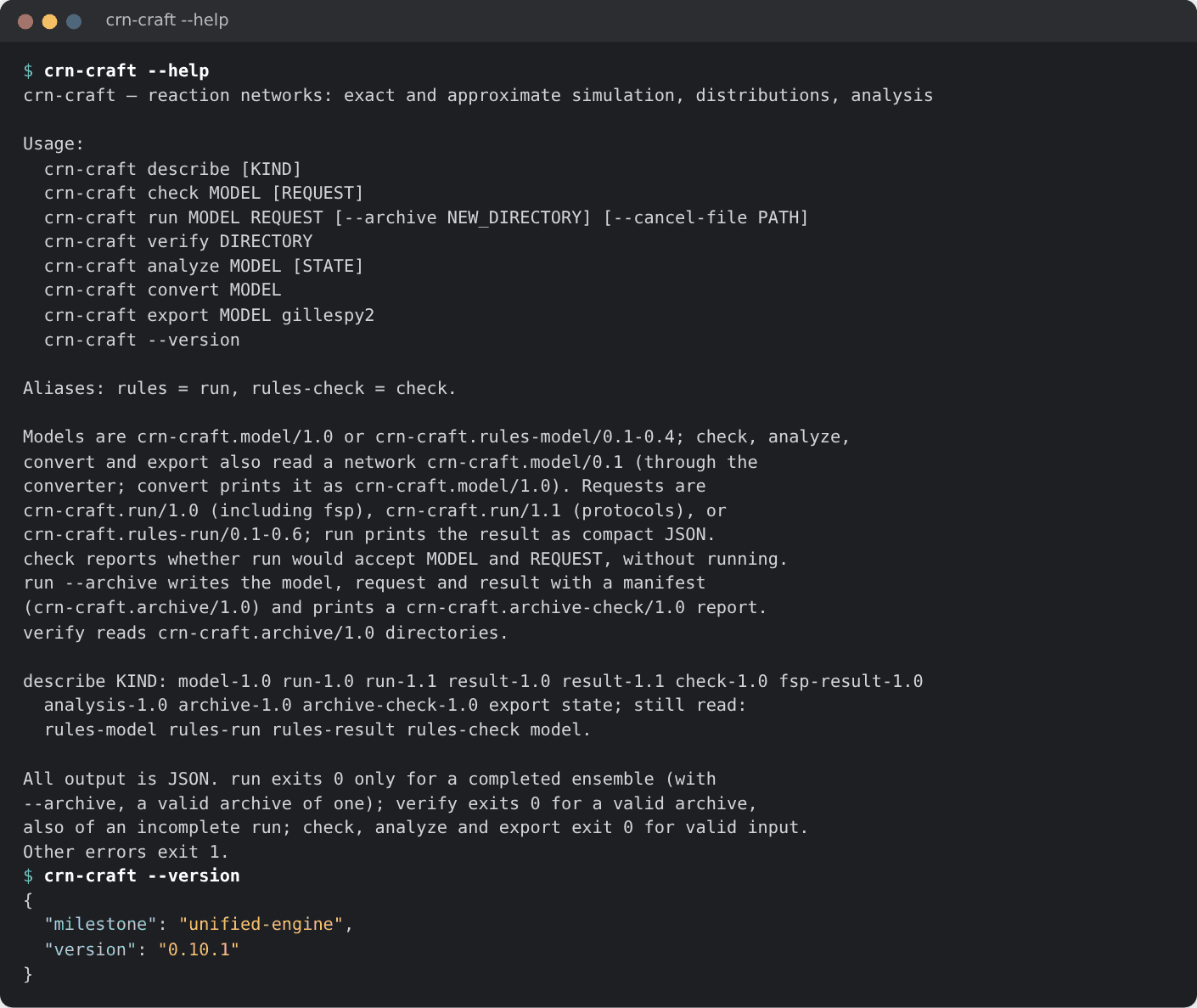
| Command | What it does | In Python |
|---|---|---|
crn-craft describe [KIND] | lists commands, methods and limits, or prints the JSON Schema of a document | crn.describe(), crn.describe("run-1.0") |
crn-craft check MODEL [REQUEST] | validates without running | crn.check(model, request) |
crn-craft run MODEL REQUEST | runs a request and prints the result | crn.prepare(model, request).simulate() |
crn-craft run ... --archive DIR | writes the run as a sealed archive | run.archive(directory) |
crn-craft verify DIR | checks an archive | crn.verify_archive(directory) |
crn-craft analyze MODEL | structure and conservation laws | Model.analyze() (chapter 11) |
crn-craft convert MODEL | converts a model of release 0.6.0 | crn.convert(data) (chapter 11) |
crn-craft export MODEL gillespy2 | writes GillesPy2 source | Model.to_gillespy2() (chapter 11) |
crn-craft-import | imports SBML and BioNetGen files | crn.read_sbml, crn.read_bngl (chapter 11) |
crn-craft describe run-1.0 prints the JSON Schema of a request, and
model-1.0, result-1.0 and fsp-result-1.0 those of the other documents.
A request file
A request says what to compute: the method, the report times, the
replicates, the seed and the budgets. crn.ensemble writes one from its
arguments; here you write it yourself. (To repeat from the shell a run that
crn.ensemble prepared, archive it in Python and replay the archive:
Replay.) It names its model by path and by
the SHA-256 of the file’s exact bytes, so a result can never be attributed
to a model that was edited afterwards:
request = {
    "schema": "crn-craft.run/1.0",
    "model": {
        "path": model_file.name,
        "sha256": hashlib.sha256(model_file.read_bytes()).hexdigest(),
    },
    "method": {"kind": "static_direct"},
    "time": {"end": 10.0, "report_times": [0.0, 1.0, 2.0, 5.0, 10.0]},
    "ensemble": {"replicates": 64, "root_seed": 42},
    "outputs": {"statistics": ["mean", "variance"], "keep_paths": 2, "keep_instances": 0},
    "budget": {
        "max_events_per_replicate": 1_000_000,
        "max_sampling_steps_per_replicate": 8_000_000,
        "max_instances": 100_000,
        "wall_time_s": 60.0,
        "threads": 1,
        "max_output_bytes": 1_048_576,
    },
}
pathlib.Path("immigration-death.run.json").write_text(json.dumps(request, indent=2) + "\n")
print(crn.check(model_file.read_bytes(), request)["valid"])
True
| Field | Meaning |
|---|---|
model | path and SHA-256 of the model file |
method | static_direct, next_reaction, tau, fsp, … (chapter 7) |
time | the end and strictly increasing report_times in [0, end] |
ensemble | the number of replicates and the root_seed |
outputs | which statistics to compute, quantiles, and how many paths to keep |
budget | the limits of chapter 3, all explicit |
Check a model and a request
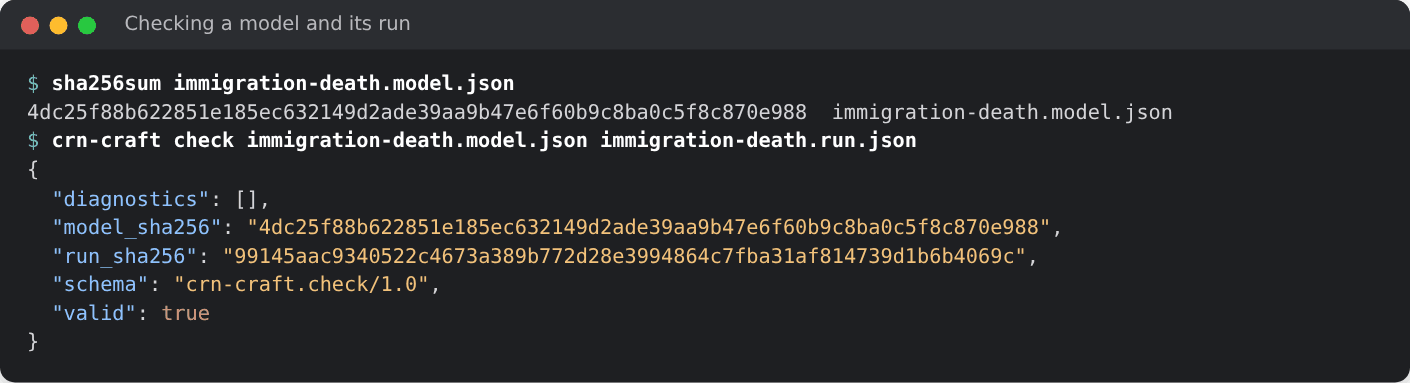
check takes a model file and an optional request and runs nothing:
sha256sum immigration-death.model.json
crn-craft check immigration-death.model.json immigration-death.run.json
Every problem is a diagnostic with a stable code, a JSON pointer to the field, a message and a hint. This block writes two broken files: a model whose rate reads a parameter that does not exist, and a request with the hash of some other model:
broken = crn.Model("immigration_death")
broken.add_species("A", 0)
broken.add_reaction("missing", [], ["A"], name="birth")
broken.add_reaction(0.2, ["A"], [], name="death")
pathlib.Path("missing-parameter.model.json").write_text(broken.to_json())
stale = json.loads(pathlib.Path("immigration-death.run.json").read_text())
stale["model"]["sha256"] = "0" * 64
pathlib.Path("stale-hash.run.json").write_text(json.dumps(stale, indent=2) + "\n")
crn-craft check missing-parameter.model.json || echo "exit status $?"
crn-craft check immigration-death.model.json stale-hash.run.json || echo "exit status $?"
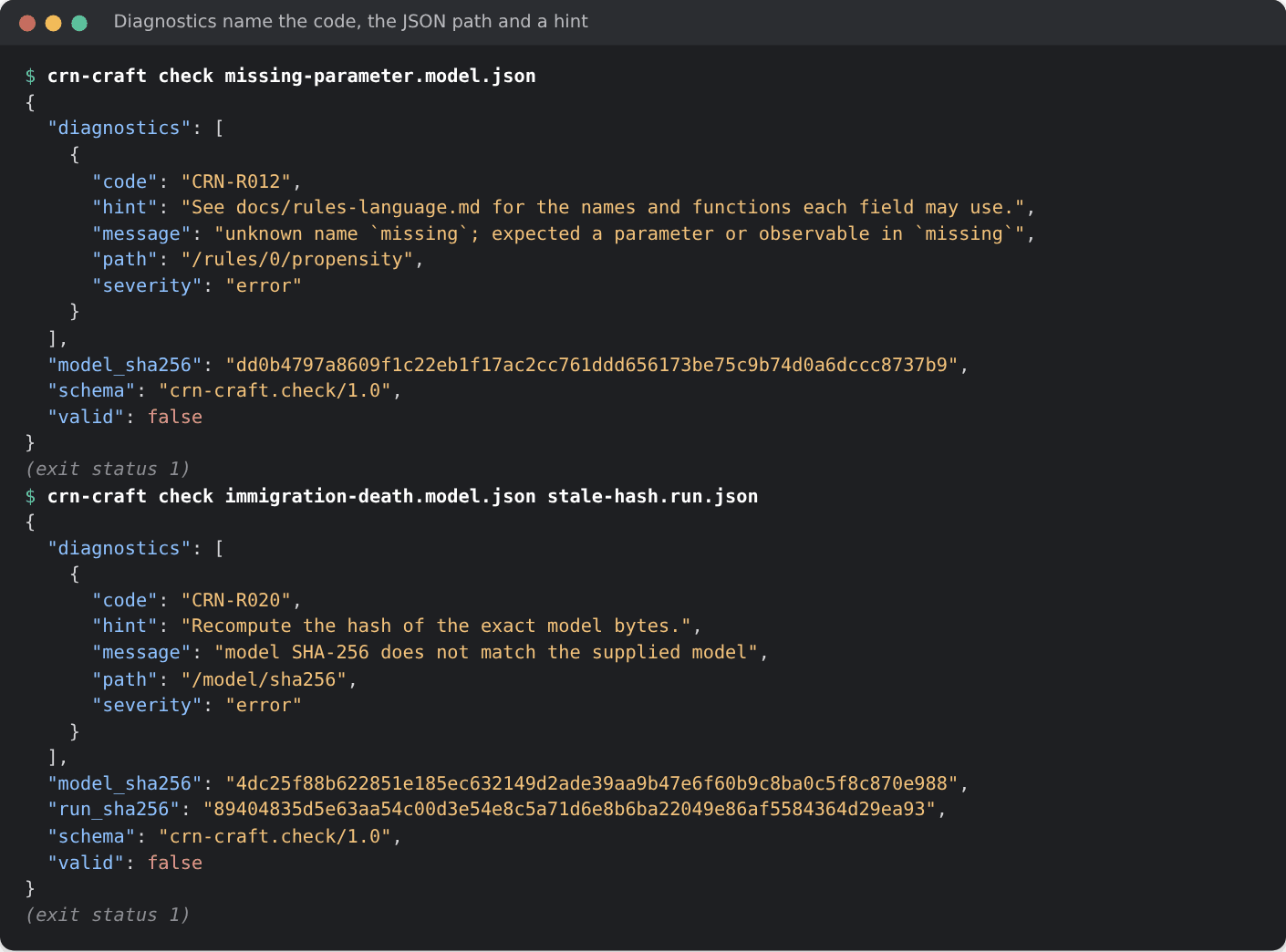
Commands exit 1 for invalid input. Warnings (CRN-W...) do not change the
exit status. Diagnostics lists every code.
Run, archive and verify
run prints the result as JSON and exits 0 only when every replicate
completed. With --archive it writes a new directory instead: the exact
model and request bytes, the result, a manifest with the SHA-256 and length
of each file, and a COMPLETE marker that holds the manifest’s hash:
crn-craft run immigration-death.model.json immigration-death.run.json --archive runs/first
crn-craft verify runs/first
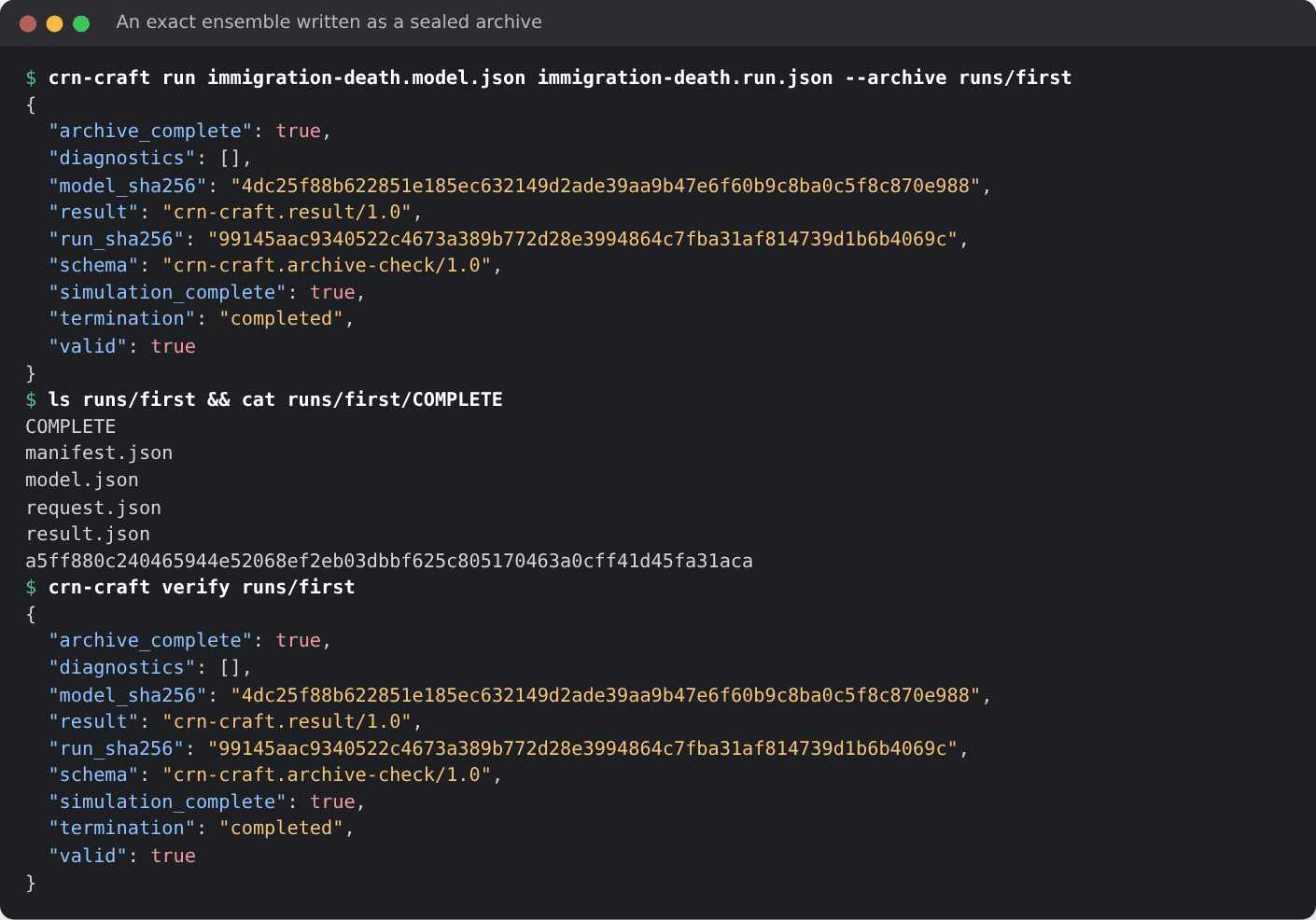
verify reads everything again, checks every hash and length, validates
the inputs and the result’s accounting, and exits 0 for a valid archive
(Archives). Change one byte and it fails:
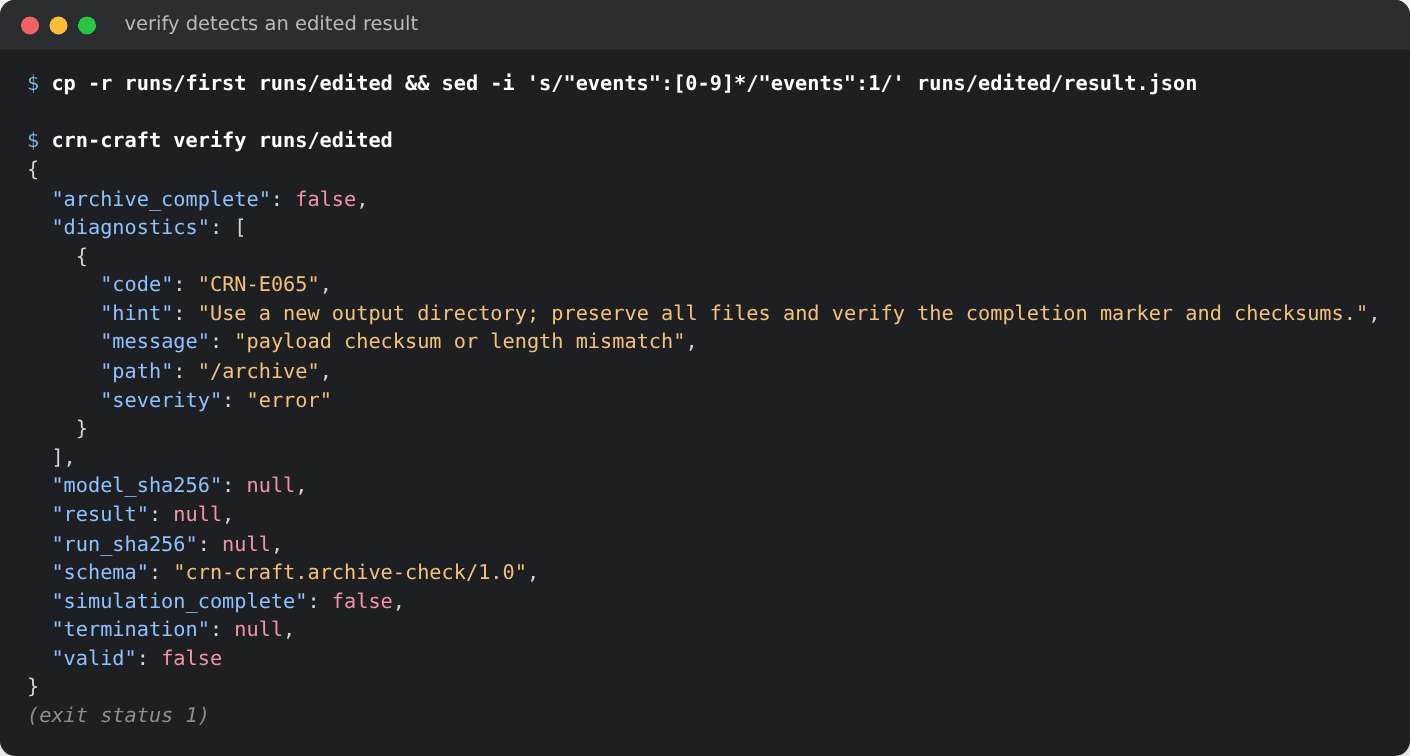
The same from Python, on a prepared run. The result file has the same bytes as the one the command wrote:
request_file = pathlib.Path("immigration-death.run.json")
run = crn.prepare(model_file.read_bytes(), request_file.read_bytes(), quantiles=())
run.archive("runs/python")
print(crn.verify_archive("runs/python")["valid"])
print(pathlib.Path("runs/python/result.json").read_bytes() == pathlib.Path("runs/first/result.json").read_bytes())
True
True
Replay
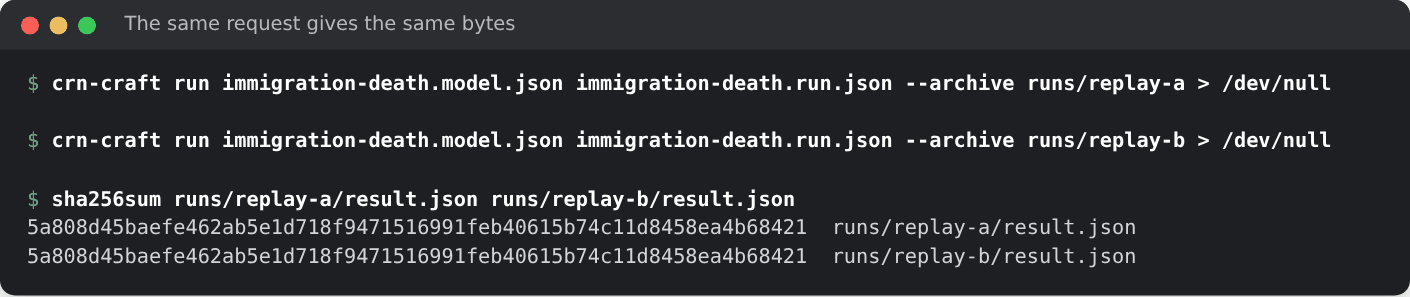
The same request gives the same bytes in a second run. The result of an archived run is a file, so two runs can be compared with a hash:
crn-craft run immigration-death.model.json immigration-death.run.json --archive runs/replay-a > /dev/null
crn-craft run immigration-death.model.json immigration-death.run.json --archive runs/replay-b > /dev/null
sha256sum runs/replay-a/result.json runs/replay-b/result.json
An archive can be replayed later, on any host. It stores the model as
model.json, and its request.json still names the model by the original
path. So copy the model next to the request under the name that the request
gives in model.path, run the two, and compare the new result.json with
the old one:
mkdir replay
cp runs/first/request.json replay/request.json
cp runs/first/model.json replay/immigration-death.model.json
crn-craft run replay/immigration-death.model.json replay/request.json --archive runs/replayed > /dev/null
cmp runs/first/result.json runs/replayed/result.json && echo "same bytes"
same bytes
Nothing in a result depends on timing, on the number of threads or on the
host. An archive that Python wrote replays in the same way, also one of a
run that crn.ensemble prepared: crn.ensemble(model, ...).archive(directory)
writes the model and the request that the call made.
Python and the command line give the same result
crn.prepare takes the same two files as bytes. quantiles=() keeps the
request as written: by default Python adds quantiles, which changes the
request hash. The result then agrees with the one that crn-craft run
prints, apart from the per-replicate records, which Python moves into
result.records:
crn-craft run immigration-death.model.json immigration-death.run.json > cli-result.json
request_file = pathlib.Path("immigration-death.run.json")
same = crn.prepare(model_file.read_bytes(), request_file.read_bytes(), quantiles=()).simulate()
cli = json.load(open("cli-result.json"))
keys = ["run_sha256", "model_sha256", "sampler", "events", "statistics", "paths"]
print(all(same.metadata[key] == cli[key] for key in keys))
print(same.metadata["run_sha256"][:16], cli["run_sha256"][:16])
True
99145aac9340522c 99145aac9340522c
Requests for fsp and tau
Another method is another method field in the same request. Finite state
projection (chapter 7)
names its bounds and has no ensemble or outputs: nothing is sampled.
request = json.loads(pathlib.Path("immigration-death.run.json").read_text())
tau = dict(request, method={"kind": "tau", "epsilon": 0.03})
pathlib.Path("tau.run.json").write_text(json.dumps(tau, indent=2) + "\n")
fsp = {
    "schema": request["schema"],
    "model": request["model"],
    "method": {"kind": "fsp", "bounds": {"A": 100}, "max_states": 102, "tolerance": 1e-10},
    "time": request["time"],
    "budget": {"wall_time_s": 60.0, "max_output_bytes": 1_048_576},
}
pathlib.Path("immigration-death.fsp.run.json").write_text(json.dumps(fsp, indent=2) + "\n")
for field, value in fsp.items():
    print(f"{field}: {json.dumps(value)}")
schema: "crn-craft.run/1.0"
model: {"path": "immigration-death.model.json", "sha256": "4dc25f88b622851e185ec632149d2ade39aa9b47e6f60b9c8ba0c5f8c870e988"}
method: {"kind": "fsp", "bounds": {"A": 100}, "max_states": 102, "tolerance": 1e-10}
time: {"end": 10.0, "report_times": [0.0, 1.0, 2.0, 5.0, 10.0]}
budget: {"wall_time_s": 60.0, "max_output_bytes": 1048576}
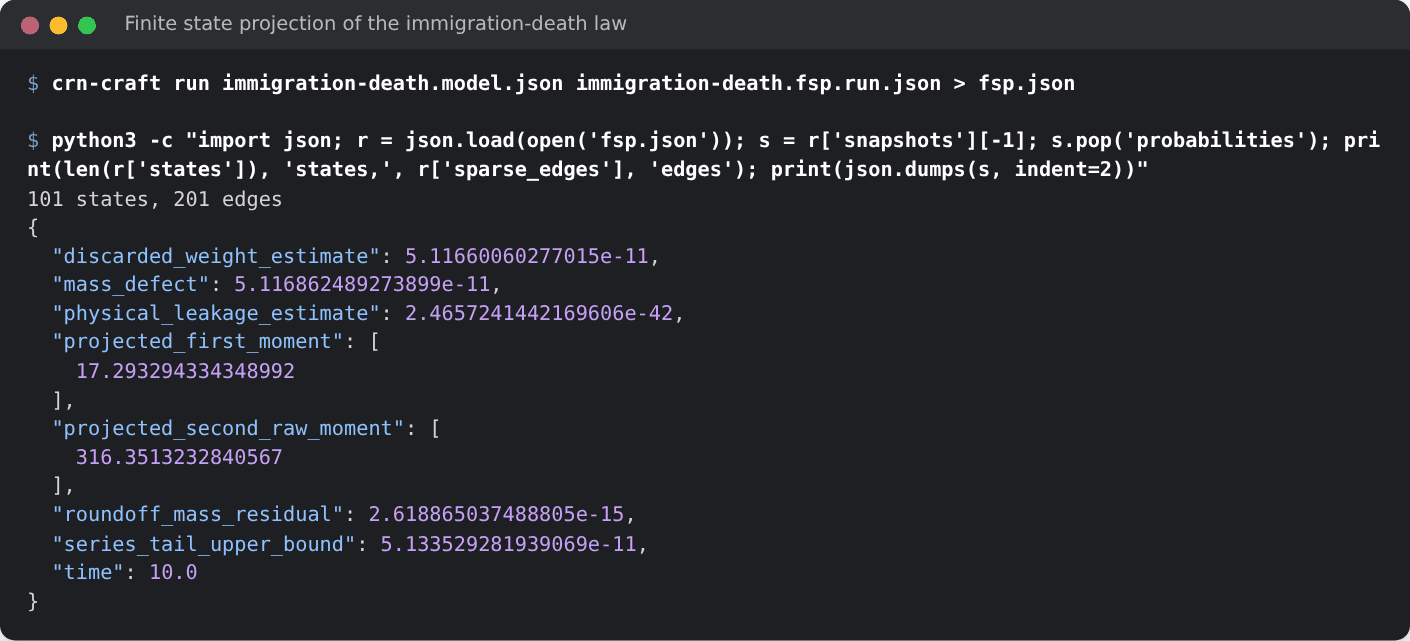
The result of an fsp request is a crn-craft.fsp-result/1.0 document with
one snapshot per report time:
crn-craft run immigration-death.model.json immigration-death.fsp.run.json > fsp.json
python3 -c "import json; print(json.load(open('fsp.json'))['snapshots'][-1]['mass_defect'])"
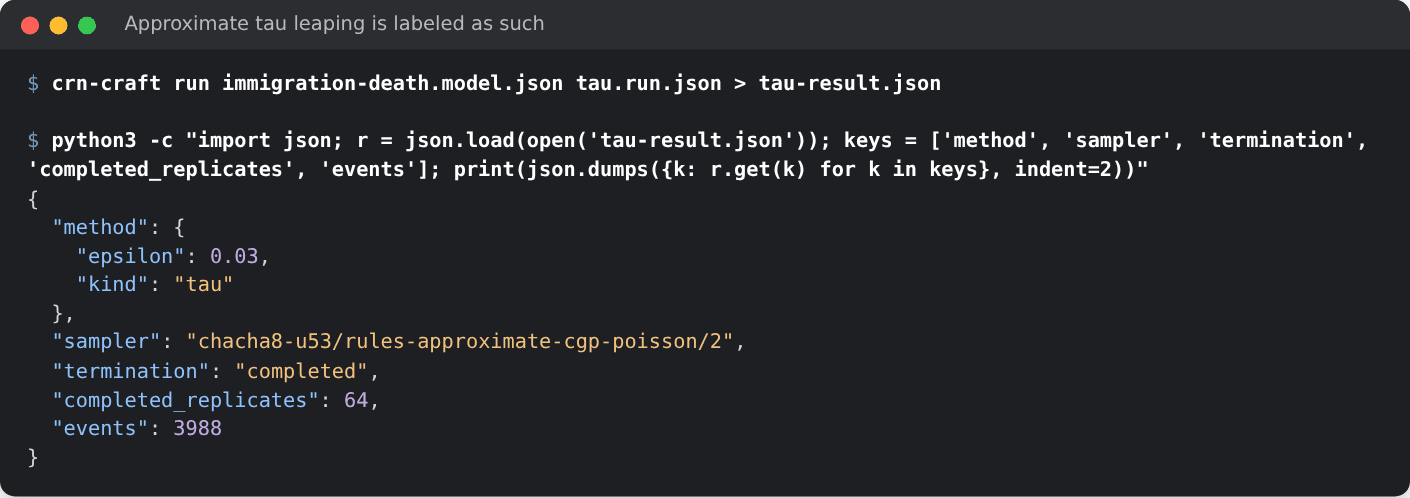
The tau request runs like any other, and its result names an approximate sampler:
crn-craft run immigration-death.model.json tau.run.json > tau-result.json
Stop a run with a cancel file
A long run can be stopped by creating a file. This request would run for a very long time:
long = json.loads(pathlib.Path("immigration-death.run.json").read_text())
long["time"] = {"end": 1e6, "report_times": [0.0, 1e6]}
long["budget"]["max_events_per_replicate"] = 10**12
del long["budget"]["wall_time_s"]
pathlib.Path("long.run.json").write_text(json.dumps(long, indent=2) + "\n")
touch stop
crn-craft run immigration-death.model.json long.run.json --archive runs/stopped --cancel-file stop || echo "exit status $?"
crn-craft verify runs/stopped > /dev/null && echo "partial archive verifies"
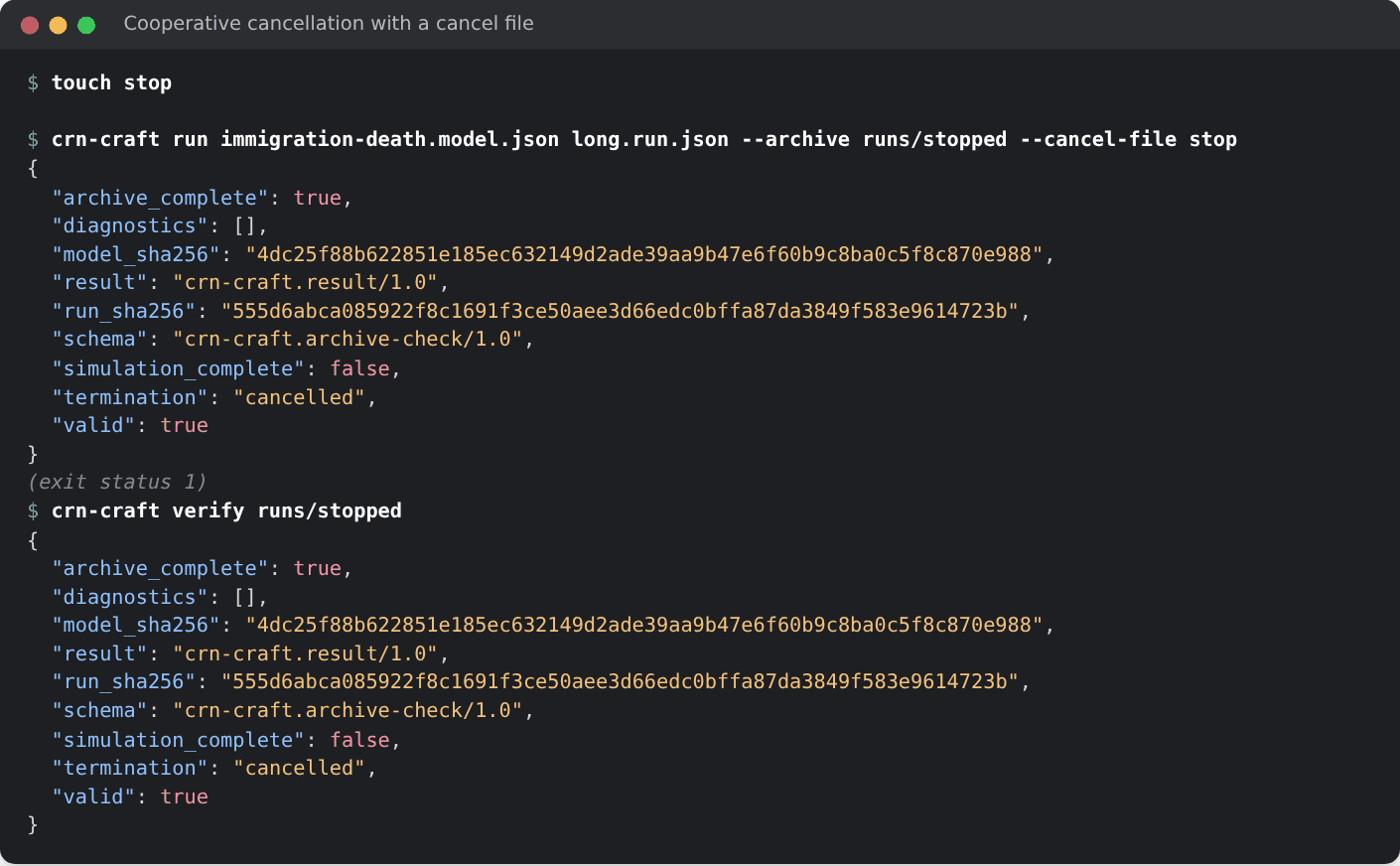
run exits 1 for an incomplete ensemble. The stopped archive is still
sealed and verifiable: it says cancelled and withholds the statistics.
Chapter 3 does the same from Python.
Versions of requests and models
This chapter writes crn-craft.run/1.0 requests for crn-craft.model/1.0
models, the current versions. Documents of earlier releases are still read
(Contracts and versions).
See also: Archives, chapter 8, chapter 11.