
Power Plant Efficiency
This tutorial
-
Is related to power-plant-efficiency-optimization.
-
Shows how to configure parallel optimization for complex simulations.
The code for this tutorial is here: powerplant.py
Motivation
tespy is a useful library for simulating thermal engineering systems. Such simulations are often used to tune parameters and improve properties like efficiency or cost, or to satisfy operating constraints. tespy has a short tutorial, but it covers only a very simple system, a single objective, and a trivial constraint.
Before moving to larger models with multiple objectives and constraints, it helps to check which optimizers work well with tespy. tespy uses statics instead of singletons, so parallel execution can become tricky. In general, avoid statics if code must run in parallel. Also be careful with singletons in Python.
The original optimization tutorial uses pygmo, which supports parallelization, but that part is implemented in C++. I could not get pygmo parallelization working with tespy. The reason may be the libraries tespy depends on. fcmaes also uses C++ multithreading for parallel function evaluation in the C++ variants of differential evolution and the multi-objective MODE algorithm. These versions do not work with tespy either. However, fcmaes also provides Python implementations of these algorithms, and those do work. The same is true for parallel optimization retry, both with Python and C++ optimizers.
Thermal Power Plant Efficiency
Note: tespy doesn’t support yet Python 3.9, tested on anaconda with python 3.8 on linux. The power plant model used in powerplant.py changes the pressure at two "extraction" connections. These pressures are the decision variables. After each simulation run, we divide "power" by "heat" to get the efficiency we want to maximize:
    def calculate_efficiency(self, x):
        # set extraction pressure
        self.nw.get_conn('extraction1').set_attr(p=x[0])
        self.nw.get_conn('extraction2').set_attr(p=x[1])

        self.nw.solve('design')
        ...
        return self.nw.busses['power'].P.val / self.nw.busses['heat'].P.val
For such a simple problem, the harmony search algorithm from the original tutorial is sufficient. Once the model has more parameters, objectives, or constraints, we need better optimizers and faster function evaluation through parallelization.
CPU Efficiency
For this section we use a different CPU: a modern 8 core / 16 thread Intel laptop CPU. The scaling issues are easier to see on this machine.
The Python BLAS/MKL configuration can have a dramatic effect on tespy performance, in this case up to a factor of 100. First, run the pygmo harmony search optimization from the original tutorial. We only make small changes to track evaluations per second. Execute:
optimize_pygmo()This runs pygmo/pagmo harmony search without parallelization:
    pop = pg.population(prob, size=32)
    algo = pg.algorithm(pg.ihs(gen=10))
We get:
Evolution: 149 Evals 1522 time 188.68 evals/time 8.07
This means we get 8.07 model.calculate_efficiency(x) calls per second.
Surprisingly, CPU load is 96 %. It should be about 6 % on an 8 core / 16 thread machine.
BLAS/MKL parallelization looks like the cause.
What happens if we restrict to 1 thread for BLAS?
            with threadpoolctl.threadpool_limits(limits=1, user_api="blas"):
                f1 = 1 / self.model.calculate_efficiency(x)
We get:
Evolution: 149 Evals 1522 time 97.61 evals/time 15.59
Now CPU load is 6 % and we get 15.59 calls per second. So letting BLAS use many threads cuts performance by a factor of 2. The extra heat is real, but the speedup is not.
The dangerous part is that, at least for anaconda, this "room heating" mode is the default.
The next step is worse. What happens if we add parallel function evaluation with fcmaes differential evolution? We configure 16 workers because we are using an 8 core / 16 thread Intel CPU:
de.minimize(wrapper(problem.fitness_so), problem.dim, problem.bounds, max_evaluations = 10000, workers=16)We see this in the logs:
395.91 370 1.0 -0.448594894567987 [25.9229649142181, 2.7403404173179116]That is 395 seconds for 370 evaluations. The non-parallel run already used 96 % CPU load. With optimizer-level parallelization, the CPU becomes overloaded and the machine turns unresponsive. Instead of speeding things up, parallelization makes the computation about 8 times slower.
Now modify the fcmaes fitness function:
def fitness(self, x):
    with threadpoolctl.threadpool_limits(limits=1, user_api="blas"):
            y = -self.efficiency(x)
Now we get:
53.73 5365 100.0 -0.4485959420678582 [25.829292859306605, 2.6867346018603175]That is 100 evaluations per second. Compared to the previous experiment, this is almost a factor of 100 from one extra line of code. At this point, the CPU heat at least buys useful work.
Takeaways:
-
Check CPU load during single-threaded optimization. If it is high, try the
with threadpoolctl.threadpool_limits(limits=1, user_api="blas"):trick. -
Parallel optimization only works if function evaluation is single threaded.
-
BLAS parallelization often hurts performance even without parallelization at the optimizer level.
-
fcmaes used
os.environ['MKL_NUM_THREADS'] = '1'to achieve the same, but this doesn’t work on all CPUs/python installations. -
fcmaes now uses
with threadpoolctl.threadpool_limits(limits=1, user_api="blas"):internally for parallel retry since version 1.3.34. Because of its overhead it is not used for parallel function evaluation, so in this case make sure you define it in your fitness function if necessary on your CPU.
Applying fcmaes to optimize the power plant:
This tutorial uses fcmaes to optimize the same model. As with pygmo, we first wrap the fitness function in a Python class. The class stores everything needed for optimization and provides two fitness functions: one that returns the constraint separately, and one that adds a penalty for constraint violations.
    class fcmaes_problem():

        def __init__(self):
            self.dim = 2
            self.nobj = 1
            self.ncon = 1
            self.bounds = Bounds([1]*self.dim, [40]*self.dim)
            self.local = threading.local()

        def get_model(self):
            if not hasattr(self.local, 'model'):
                self.create_model()
            return self.local.model

        def create_model(self):
            self.local.model = PowerPlant()

        def efficiency(self, x):
            try:
                with threadpoolctl.threadpool_limits(limits=1, user_api="blas"):
                    eff = self.get_model().calculate_efficiency(x)
                if not np.isfinite(eff): # model gets corrupted in case of an error
                    self.create_model() # we need to recreate the model
                    return 0
                return eff
            except Exception as ex:
                return 0

        def fitness(self, x):
            y = -self.efficiency(x)
            c = -x[0] + x[1]
            return [y, c]

        def fitness_so(self, x):
            if x[1] > x[0]: # handle constraint
                return 1000 + x[1] - x[0]
            return -self.efficiency(x)
The constraint c = -x[0] + x[1] only requires the second pressure to be lower than the
first. That makes it easy to handle with a simple linear penalty. This gives access to
many more algorithms, including BiteOpt, Differential Evolution, CMA-ES, CR-FM-NES, and
others. The only fcmaes algorithm with explicit constraint handling is MODE. Equality
constraints do not need special treatment because they can be converted into inequality
constraints: a = b → abs(a-b) ⇐ 0.
The lines:
    if not np.isfinite(eff): # model gets corrupted in case of an error
        self.create_model() # we need to recreate the model
recreate the model after an error. We noticed that the model sometimes returned values "too good to be true" after such failures. The same problem appears even in non-parallel optimization. We filed a tespy bug for this issue, but until it is fixed we need this workaround. We also use thread-local model instances to avoid multi-threading issues.
To run an experiment, execute
optimize_fcmaes()after uncommenting one of the optimizer calls:
    # Parallel retry of different single-objective optimizers

    # ret = retry.minimize(wrapper(problem.fitness_so), problem.bounds,
    #                       num_retries = 32, optimizer=Bite_cpp(20000))
    #
    # ret = retry.minimize(wrapper(problem.fitness_so), problem.bounds,
    #                       num_retries = 32, optimizer=De_cpp(20000))
    #
    # ret = retry.minimize(wrapper(problem.fitness_so), problem.bounds,
    #                       num_retries = 32, optimizer=Cma_cpp(20000))
    #
    # ret = retry.minimize(wrapper(problem.fitness_so), problem.bounds,
    #                       num_retries = 32, optimizer=Crfmnes_cpp(20000))

    # Multi objective optimization parallel retry:

    # x, y = modecpp.retry(mode.wrapper(problem.fitness, problem.nobj), problem.nobj,
    #              problem.ncon, problem.bounds,
    #              popsize = 32, max_evaluations = 1000000,
    #              nsga_update=True, num_retries = 32,
    #              workers=32)
    #
    # # Differential Evolution using parallel function evaluation:
    #
    ret = de.minimize(wrapper(problem.fitness_so), problem.dim, problem.bounds, max_evaluations = 20000, workers=32)

    # Multi objective optimization using parallel function evaluation:

    # x, y = mode.minimize(mode.wrapper(problem.fitness, problem.nobj), problem.nobj,
    #                            problem.ncon, problem.bounds,
    #                            popsize = 32, max_evaluations = 100000, nsga_update=True,
    #                            workers=32)

    # The C++ version of this algorithm only works single threaded with tespy, but modecpp.retry works multi threaded

    # x, y = modecpp.minimize(mode.wrapper(problem.fitness, problem.nobj), problem.nobj,
    #                            problem.ncon, problem.bounds,
    #                            popsize = 32, max_evaluations = 100000, nsga_update=True,
    #                            workers=1)

    # some single threaded single objective optimizers

    #ret = decpp.minimize(wrapper(problem.fitness_so), problem.dim, problem.bounds, max_evaluations = 20000)

    #ret = cmaes.minimize(wrapper(problem.fitness_so), problem.bounds, max_evaluations = 20000)

    #ret = bitecpp.minimize(wrapper(problem.fitness_so), problem.bounds, max_evaluations = 20000)

    #ret = de_cma(20000).minimize(wrapper(problem.fitness_so), problem.bounds)
The preconfigured option is
de.minimize(wrapper(problem.fitness_so), problem.dim, problem.bounds, max_evaluations = 20000, workers=32)This runs fcmaes Differential Evolution with parallel function evaluation.
On an AMD 5950x 16 core CPU we see something like:
39.15 13535 346.0 -0.4485959202134408 [25.829239333756185, 2.686719511836477]which means:
-
time = 39.15 seconds
-
evaluations = 13535
-
346 evaluations / second
-
-0.4485959202134408 actual efficiency (negative because we maximize and fcmaes minimizes)
-
[25.829239333756185, 2.686719511836477] the configured pressure levels.
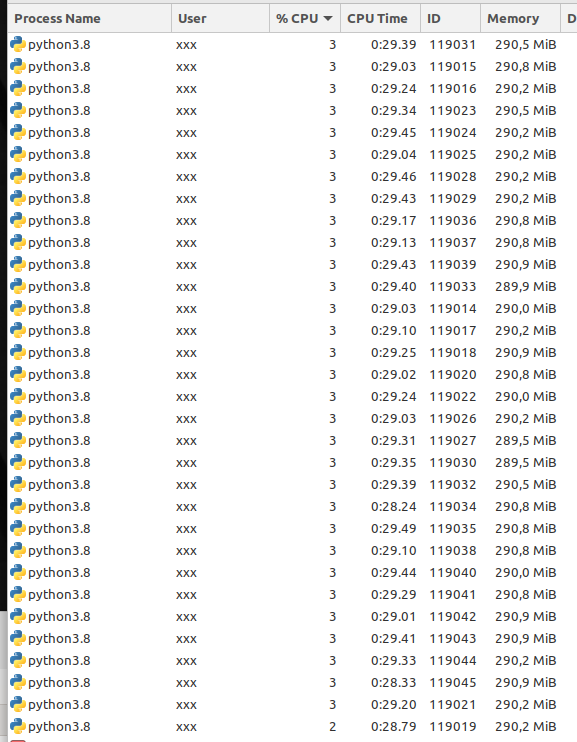
In single-threaded mode we get about 18-19 evaluations per second, so this scales well with the number of CPU cores used:
Conclusion
-
fcmaes is a good choice for expensive Python simulations such as tespy models.
-
It supports parallel function evaluations and parallel optimization retries.
-
Modern CPUs scale well with the number of cores used, as long as the fitness function is single threaded.
-
BLAS usage needs to be restricted to one thread, which in case of tespy surprisingly also increases performance even if the simulation is not called in parallel.
-
Use thread local model instances to avoid parallelization issues.
-
Errors during the simulation can corrupt the model. We mitigate this tespy bug by recreating the model if an error occurs.